



This tutorial demonstrates how to write effective tests for your React application with react testing library and jest.
We will cover
- How to write effective tests for your react components
- Mocking API calls
- How to test Redux connected component
- Testing custom hooks
Why write tests?
The main reason we write tests is to prevent bugs, keep code clean and maintainable. Testing might seem like extra work at first. Why write tests when you could be delivering features for your application? Writing tests may seem like unproductive work that doesn’t add any immediate value to your project. However, writing effective tests ensures the delivery of well maintained, bug-free code. If you don’t write tests there’s a good chance that you will deliver bugs and as the product grows you will spend more and more time fixing these bugs. Therefore, choosing to write automated tests is a worthwhile investment.
Don’t get too excited though. Tests are really a double-edged sword. You can very well end up wasting a lot of time (and money of course) writing tests that have absolutely no value. An effective well-written test ensures application quality and maintainability. Whereas a bad tests is just a waste of time and resource that doesn’t provide any value. An effective test ensures how the application (or a component of the application) should behave form a user’s perspective. It doesn’t test the implementation details from a programmer’s perspective. If you are writing tests to verify implantation details you are wasting valuable time and the test coverage you have is nothing but a false sense of security.
Testing React Apps
We will be using the react-testing-library for this tutorial. This library is specifically designed to test application behavior and avoid testing implementation. You can also use libraries like enzymes to do this. However, as you will see react-testing-library is a relatively easy framework to use and it comes pre-packaged with create-react-app.
You can find the full docs for react-testing-library here
Let’s test our first component. Below we have a sample form. The form has two fields Name and Age. One is a text field and the other is a number field (only accepts numeric value). Additionally, our submit button is disabled when the name is empty.
import React from 'react';
import './App.css';
function App() {
  const [state, setState] = React.useState({
    name: '',
    age: '',
  });
  const handleSubmit = e => {
    e.preventDefault();
  }
  const updateName = e => {
    e.preventDefault();
    setState({...state, name: e.target.value})
  }
  const updateAge = e => {
    e.preventDefault();
    setState({...state, age: e.target.value})
  }
  return (
    <div className="App">
      <h1>Welcome {state.name}</h1>
      <form onSubmit={handleSubmit}>
        <label>
          Name:
          <input type="text" value={state.name} onChange={updateName} />
        </label>
        <br />
        <label>
          Age:
          <input type="number" value={state.age} onChange={updateAge} />
        </label>
        <br />
        <input type="submit" value="Submit" disabled={state.name === ''}/>
      </form>
    </div>
  );
}
export default App;
We also have couple handler functions to update and submit the form. Now let’s write some test for it.
App.test.js
import React from 'react';
import { render } from '@testing-library/react';
import App from './App';
/**
 * Test What user would see
 */
test('renders the form correctly', () => {
  const { getByText, getByLabelText } = render(<App />);
  const nameLabel = getByText(/Name:/i);
  const ageLabel = getByText(/Age:/i);
  expect(nameLabel).toBeInTheDocument();
  expect(ageLabel).toBeInTheDocument();
  const input = getByLabelText(/Age:/i);
  expect(input).toHaveAttribute('type', 'number')
});
In the test case above as you can see we are testing the behavior of the app from the user’s perspective. We care about what’s in the DOM. Which DOM elements the user can interact with and so on.
For instance, the user should see the submit button disabled when the Name field is empty. We can write a test for it like below.
test('submit button should be disabled when Name is empty', () => {
  const { getByLabelText, getByRole } = render(<App />);
  const input = getByLabelText(/Name:/i);
  fireEvent.change(input, { 'target': { 'value': '' } });
  const submitBtn = getByRole('button', { name: 'Submit' });
  expect(submitBtn).toHaveAttribute('disabled');
});
We are using the fireEvent from react-testing-library here to mock the DOM event. In line 4 we are using the change function to change the Name field. When the name field is empty we expect the submit button to be disabled.
Debugging Tests
At any point, if we want to inspect a DOM node we can do that easily with the debug function of the testing library. Here’s an example
test('submit button should be disabled when Name is empty', () => {
  const { getByLabelText, getByRole, debug } = render(<App />);
  const input = getByLabelText(/Name:/i);
  fireEvent.change(input, { 'target': { 'value': '' } });
  const submitBtn = getByRole('button', { name: 'Submit' });
  expect(submitBtn).toHaveAttribute('disabled');
  debug(submitBtn);
  fireEvent.change(input, { 'target': { 'value': 'John Doe' } });
  debug(submitBtn);
  expect(submitBtn).not.toHaveAttribute('disabled');
});
We called the debug function in line 7 before we changed the input and then we called it again in line 9. In our terminal when we run npm run test we will see the following.
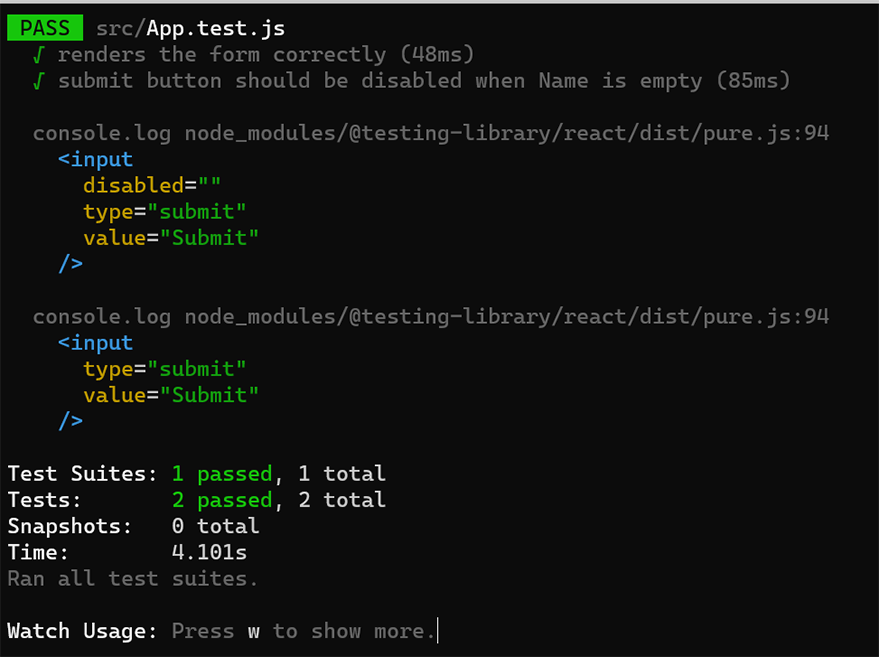
As you can see in the first instance the submit button was disabled and in the second instance, the button was not disabled.
Mocking API Requests
Let’s see how we can unit test a react component that is making API calls. The tricky part here is to mock the API request/response. We don’t want to make any API calls from our test code. There are two reasons for this.
- API calls are slow and it will make our tests run slower. Moreover, we don’t want to use up our backend resources by making API requests from the test code.
- API responses can be unpredictable. The backend we are calling may respond with unpredictable data. If something changes in the backed our tests will start to fail. Our frontend will be tightly coupled with backend implementation.
First, let’s take a look at the component we are testing.
`Form.js`
import React from 'react';
import './App.css';
import * as apiService from './api'

function SimpleAPIForm() {
  const [state, setState] = React.useState({
    message: '',
    post: ''
  });
  const handleSubmit = async e => {
    e.preventDefault();
    const response = await apiService.postProducts(state.post);
    if(response.ok) {
        setState({
            message: 'Successfully Created Post!!',
            post: ''
        })
    }
  }
  const updateEmail = e => {
    e.preventDefault();
    setState({...state, post: e.target.value})
  }
  return (
    <div className="App">
      {state.message ? <h1>{state.message}</h1> : null}
      <form onSubmit={handleSubmit}>
        <label>
            Body:
          <input type="text" value={state.post} onChange={updateEmail} />
        </label>
        <br />
        <input type="submit" value="Post" />
      </form>
    </div>
  );
}
export default SimpleAPIForm;
api.js
export async function postProducts(title) {
    const requestOptions = {
        method: 'POST',
        headers: { 'Content-Type': 'application/json' },
        body: JSON.stringify({ title })
    };
    const response = await fetch('https://reqres.in/api/products', requestOptions);
    return response;
}
Here we have a simple form that makes a POST call on submit. Once we get back a response we change the header of the page with a message. Let’s create a test for this.
// Form.test.js
import React from 'react';
import { render, fireEvent, wait } from '@testing-library/react';
import SimpleAPIForm from './Form';
import * as apiServiceMock from './api';

jest.mock('./api');

test('form makes a api call with proper value', async () => {
    apiServiceMock.postProducts.mockResolvedValueOnce({ ok: true });
    const { getByText, getByLabelText, debug } = render(<SimpleAPIForm />);
    const inputField = getByLabelText(/Body:/i);
    const submitBtn = getByText(/Post/i);
    fireEvent.change(inputField, { 'target': { 'value': 'Sample Title' } });
    fireEvent.click(submitBtn);
    expect(apiServiceMock.postProducts).toHaveBeenCalledTimes(1);
    expect(apiServiceMock.postProducts).toHaveBeenCalledWith("Sample Title");
    await wait(() => null);
});
Let’s go over the code. First of all notice how in this test we are calling jest.mock function on line 7. This will create mocks for our API calls. In line 10 we are defining what the mock response for postProducts will be. Then we mimic the user behavior of submitting a post. On lines 16 and 17 we make sure that the API call has been made once when the form is submitted with the correct input value. Now you might be wondering what’s happening in line 18. Well react will give us a warning. After the promise resolved in the component react tries to update that component (line 14 of Form.js file). Since the component state has changed react will warn us that maybe there is something missing. However, since we mocked the api call we can use the wait function that comes with the testing library.
Testing a Redux Component
Let’s take a look at how we can test a Redux component. First, let’s start with an application that has a Redux setup. Below I have a setup a very basic Redux application.
P.S. If you are interested in how to setup a redux application we have a comprehensive guide to Redux that you can find in this link.
For the purpose of this tutorial, the Redux application we are using is a bare bone and taken from Redux documentation site.
// index.js
import React from 'react';
import ReactDOM from 'react-dom';
import './index.css';
import App from './App';
import Form from './Form';
import Counter from './Count';
import * as serviceWorker from './serviceWorker';
import { Provider } from 'react-redux';
import store from './store';

ReactDOM.render(
  <React.StrictMode>
    <Provider store={store}>
      <Counter />
    </Provider>
  </React.StrictMode>,
  document.getElementById('root')
);

serviceWorker.unregister();
We have to set up a simple store like below
// store.js
import { createStore } from "redux";
import rootReducer from "./reducers";
export default createStore(rootReducer);
And we need a reducer like below
// reducers.js
const initialState = {count: 0}
export default function reducers(state = initialState, action) {
  switch (action.type) {
    case 'INCREMENT':
      return {
        count: state.count + 1,
      }
    case 'DECREMENT':
      return {
        count: state.count - 1,
      }
    case 'RESET':
      return {
        count: 0
      }
    default:
      return state
  }
}
We have a simple counter component that is connected to Redux. Here’s how the code looks for the Counter component.
// Count.js
import React from 'react';
import {useSelector, useDispatch} from 'react-redux';

function Count() {
    const state = useSelector(state => state.count);
    const dispatch = useDispatch();
    const decrement = () => {
        dispatch({type: 'DECREMENT'})
    }
    const increment = () => {
        dispatch({type: 'INCREMENT'})
    }
    const reset = () => {
        dispatch({type: 'RESET'})
    }
    return (
        <div>
          <h2>Current Count: {state}</h2>
          <div>
            <button onClick={decrement}>-</button>
            <button onClick={reset}>Reset</button>
            <button onClick={increment}>+</button>
          </div>
        </div>
    )
}
export default Count;
We are all set with the code. Now let’s write a test for this Counter component. Let’s take a look at the code below.
//Count.test.js
import React from 'react';
import { render, fireEvent } from '@testing-library/react';
import {Provider} from 'react-redux'
import Counter from './Count';
import store from './store';
test('redux component functionality', () => {
    const { getByText } = render(
        <Provider store={store}>
            <Counter />
        </Provider>
    );
    fireEvent.click(getByText('+'));
    expect(getByText('Current Count: 1')).toBeInTheDocument();
    fireEvent.click(getByText('-'));
    fireEvent.click(getByText('-'));
    expect(getByText('Current Count: -1')).toBeInTheDocument();
    fireEvent.click(getByText('Reset'));
    expect(getByText('Current Count: 0')).toBeInTheDocument();
});
As you can see above we are wrapping our Counter component with a Redux provider. We also passed our store as a prop in the provider. Notice that, this setup allows us to not only test the component but also the store. We are testing the whole integration of React Redux flow here. This is what makes this test effective. If these tests pass we can confidently say that our component integration is in fact working. As we introduce new features and start reusing our components and if any of these tests break, then we would be able to tell that something is wrong with the new features that we wrote. This way existing tests will prevent buggy code from getting into production. Moreover, if we decide to switch from Redux to some other state management tool such as MobX, we would require a minimal amount of changes.
How to test a custom hook?
Hooks are quite an amazing feature of the React ecosystem. Hooks enable the sharing of code logic among multiple components. Let’s take a look at how we can test our hooks with react-testing-library.
Here’s a custom hook that we are going to test.
// CustomHook.js
import React from 'react';
function useMultiplier({ initialNum = 1 } = {}) {
    const [num, setNum] = React.useState(initialNum);
    const multiply = factor => setNum( initialNum * factor );
    return { num, multiply }
}
export {useMultiplier};
The react-testing-library makes it really easy to test these custom hooks. Let’s create a new test file for this hook.
// CustomHook.test.js
import React from 'react';
import { render, act } from '@testing-library/react';
import { useMultiplier } from './CustomHook';
test('Custom hook should be able to multiply properly', () => {
    let result = null;
    function Test() {
        result = useMultiplier({initialNum: 1});
        return null;
    }
    render(<Test />)
    expect(result.num).toBe(1)
    act(() => result.multiply(4))
    expect(result.num).toBe(4)
});
Notice that from lines 7 to 10 we are creating a new Test component. We plug our custom hook in the test component and check its behavior. Simple and easy.
If you would like to dive deeper into testing custom hooks I suggest you read this article by Kent C Dodds about testing custom hooks
And that’s a wrap. I hope this article was useful. Hopefully, this post will help get started on writing your own effective tests and delivering react apps with confidence. For more articles like this one please subscribe to our new letter. Until next time
