

Close Menu
Soshace Digital Blog

    Subscribe to Updates

    Get The Latest News, Updates, And Amazing Offers

    What's Hot
    JavaScript

    TOP 5 Books about Silicon Valley that Blew Up the Internet

    Development

    Integrating Data Privacy into Effective Software Development

    JavaScript

    Rendering Patterns: Static and Dynamic Rendering in Nextjs

    Important Pages:
    • Home
    • About
    • Services
    • Contact Us
    • Privacy Policy
    • Terms & Conditions
    Facebook X (Twitter) Instagram LinkedIn YouTube
    Today's Picks:
    • Scaling Success: Monitoring Indexation of Programmatic SEO Content
    • Leveraging Influencers: Key Drivers in New Product Launches
    • How Privacy-First Marketing Will Transform the Industry Landscape
    • The Impact of Social Proof on Thought Leadership Marketing
    • Balancing Value-Driven Content and Promotional Messaging Strategies
    • Top Influencer Marketing Platforms to Explore in 2025
    • Emerging Trends in Marketing Automation and AI Tools for 2023
    • Strategies to Mitigate Duplicate Content in Programmatic SEO
    Wednesday, January 21
    Facebook X (Twitter) Instagram LinkedIn YouTube
    Soshace Digital Blog
    • Home
    • About
    • Services
    • Contact Us
    • Privacy Policy
    • Terms & Conditions
    Services
    • SaaS & Tech

      Maximizing Efficiency: How SaaS Lowers IT Infrastructure Costs

      August 27, 2025

      Navigating Tomorrow: Innovations Shaping the Future of SaaS

      August 27, 2025

      Maximizing Impact: Strategies for SaaS & Technology Marketing

      August 27, 2025
    • AI & Automation

      Enhancing Customer Feedback Analysis Through AI Innovations

      August 27, 2025

      Navigating the Impact of AI on SEO and Search Rankings

      August 27, 2025

      5 Automation Hacks Every Home Service Business Needs to Know

      May 3, 2025
    • Finance & Fintech

      Critical Missteps in Finance Marketing: What to Avoid

      August 27, 2025

      Analyzing Future Fintech Marketing Trends: Insights Ahead

      August 27, 2025

      Navigating the Complex Landscape of Finance and Fintech Marketing

      August 27, 2025
    • Legal & Compliance

      Exploring Thought Leadership’s Impact on Legal Marketing

      August 27, 2025

      Maximizing LinkedIn: Strategies for Legal and Compliance Marketing

      August 27, 2025

      Why Transparency Matters in Legal Advertising Practices

      August 27, 2025
    • Medical Marketing

      Enhancing Online Reputation Management in Hospitals: A Guide

      August 27, 2025

      Analyzing Emerging Trends in Health and Medical Marketing

      August 27, 2025

      Exploring Innovative Content Ideas for Wellness Blogs and Clinics

      August 27, 2025
    • E-commerce & Retail

      Strategic Seasonal Campaign Concepts for Online and Retail Markets

      August 27, 2025

      Emerging Trends in E-commerce and Retail Marketing Strategies

      August 27, 2025

      Maximizing Revenue: The Advantages of Affiliate Marketing for E-Commerce

      August 27, 2025
    • Influencer & Community

      Leveraging Influencers: Key Drivers in New Product Launches

      August 27, 2025

      Top Influencer Marketing Platforms to Explore in 2025

      August 27, 2025

      Key Strategies for Successful Influencer Partnership Negotiations

      August 27, 2025
    • Content & Leadership

      The Impact of Social Proof on Thought Leadership Marketing

      August 27, 2025

      Balancing Value-Driven Content and Promotional Messaging Strategies

      August 27, 2025

      Analyzing Storytelling’s Impact on Content Marketing Effectiveness

      August 27, 2025
    • SEO & Analytics

      Scaling Success: Monitoring Indexation of Programmatic SEO Content

      August 27, 2025

      Strategies to Mitigate Duplicate Content in Programmatic SEO

      August 27, 2025

      Effective Data Visualization Techniques for SEO Reporting

      August 27, 2025
    • Marketing Trends

      How Privacy-First Marketing Will Transform the Industry Landscape

      August 27, 2025

      Emerging Trends in Marketing Automation and AI Tools for 2023

      August 27, 2025

      Maximizing ROI: Key Trends in Paid Social Advertising

      August 27, 2025
    Soshace Digital Blog
    Blog / JavaScript / POS Tutorial / Create simple POS with React, Node and MongoDB #5: Setup ReCaptcha and define CORS
    JavaScript

    Create simple POS with React, Node and MongoDB #5: Setup ReCaptcha and define CORS

    Krissanawat KaewsanmuangBy Krissanawat KaewsanmuangMarch 6, 2020Updated:March 6, 2020No Comments4 Mins Read
    Facebook Twitter Pinterest Telegram LinkedIn Tumblr Email Reddit
    Create simple POS with React, Node and MongoDB #5: Setup ReCaptcha and define CORS
    Share
    Facebook Twitter LinkedIn Pinterest Email Copy Link
    Setup ReCaptcha and define CORS
    Setup ReCaptcha and define CORS

    Defenition: POS – “Point of Sale”. At the point of sale, the merchant calculates the amount owed by the customer, indicates that amount, may prepare an invoice for the customer (which may be a cash register printout), and indicates the options for the customer to make payment.

    Setup ReCaptcha and define CORSPrevious article: Optimize App and Setup Deployment Workflow.

    For the Frontend, we will use ReCaptcha protected form;

    For backend, we will define CORS, which will be receiving requests only from the Frontend.

    Setup ReCaptcha protected frontend

    Step one: We will get Recaptcha key from Google
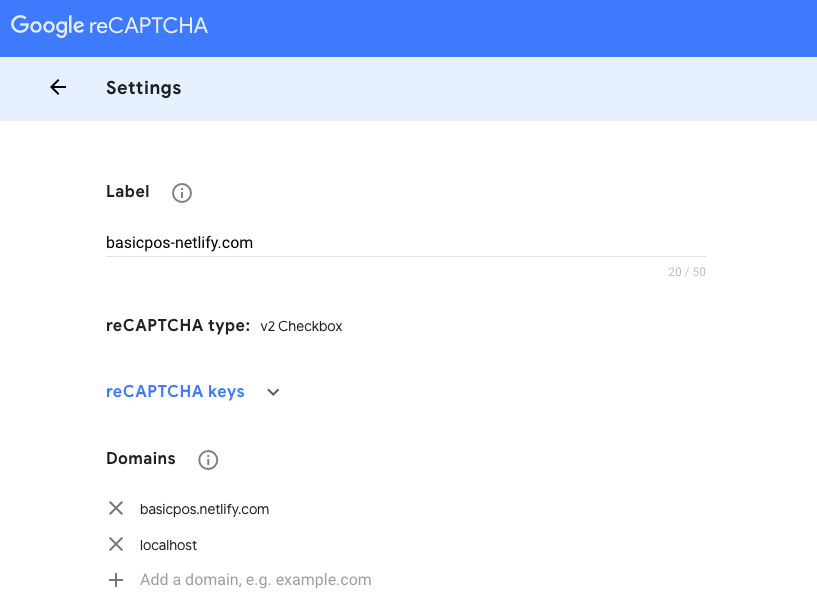
    Google Recaptcha setting domain page
    Google Recaptcha setting domain page

    Step two: Add our whitelist domain, then choose localhost and Netlify, then grab Recaptcha key, and finally, set up on Netlify first
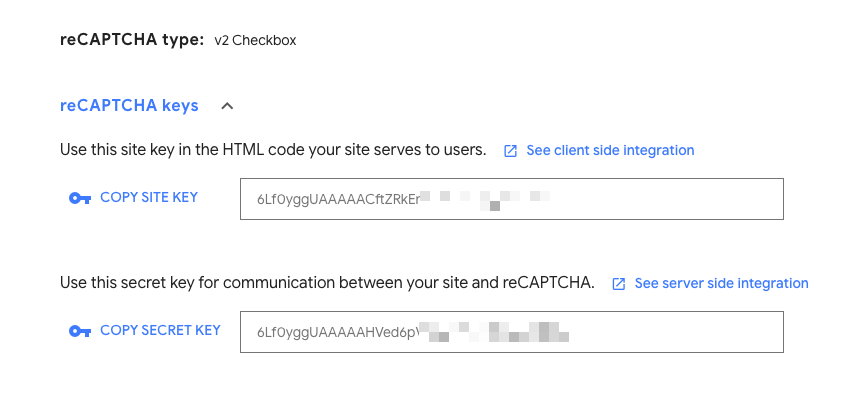
    Google Recaptcha api key
    Google Recaptcha api key

    Step three: Setting up on Netlify. Go to Netlify dashboard and setup Recaptcha Key as an environment variable
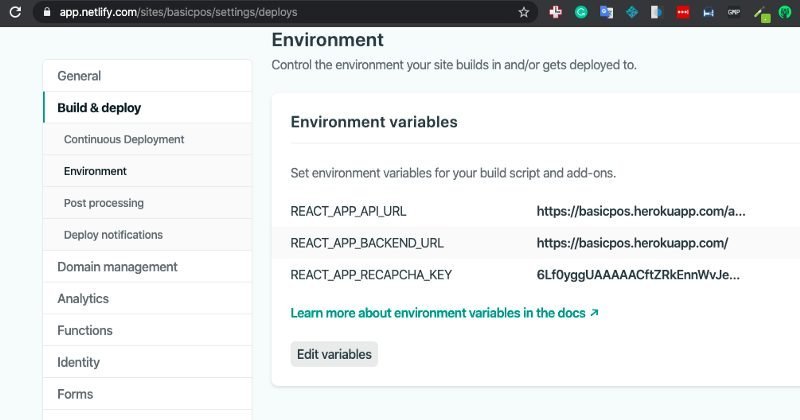
    Netlify deploy setting page
    Netlify deploy setting page

    Step four: Now come back to local and install React Captcha package

    npm install react-recaptcha

    Step five: Next step is to import Recaptcha

    import Recaptcha from "react-recaptcha";

    Step six: Add validation rule name Recaptcha as required

    const LoginSchema = Yup.object().shape({
       username: Yup.string()
                    .min(2, "username is Too Short!")
                    .max(50, "username is Too Long!")
                    .required("Username is Required"),
                recaptcha: Yup.string().required(),
                password: Yup.string().required("Password is required")
       });

    Step seven: We will create a function for initializing Recaptcha

    initilizeRecaptcha = async => {
        const script = document.createElement("script");
        script.src = "https://www.google.com/recaptcha/api.js";
        script.async = true;
        script.defer = true;
        document.body.appendChild(script);
      };
      componentDidMount() {
        this.initilizeRecaptcha();
    }

    Last step: Add <Recaptcha> component and a validation message

    <div className="form-group">
              <label>Recaptcha Validation</label>
              <Recaptcha
                sitekey={process.env.REACT_APP_RECAPCHA_KEY}
                render="explicit"
                theme="light"
                verifyCallback={response => {
                  setFieldValue("recaptcha", response);
                }}
                onloadCallback={() => {
                  console.log("done loading!");
                }}
              />
         {errors.recaptcha && touched.recaptcha && <p>{errors.recaptcha}</p>}
     </div>

    Your final result should look like the image below

    Read More:  React Native vs. Flutter: Which One Would Suit You Better?
    ReCaptcha to login page
    add ReCaptcha to login page

    One more step: We’ll be adding register and forgot password form

    add ReCaptcha to register page
    add ReCaptcha to register page
    add ReCaptcha to login page
    add ReCaptcha to login page

    You will be able to fill all input, but can’t submit without resolving the Recaptcha
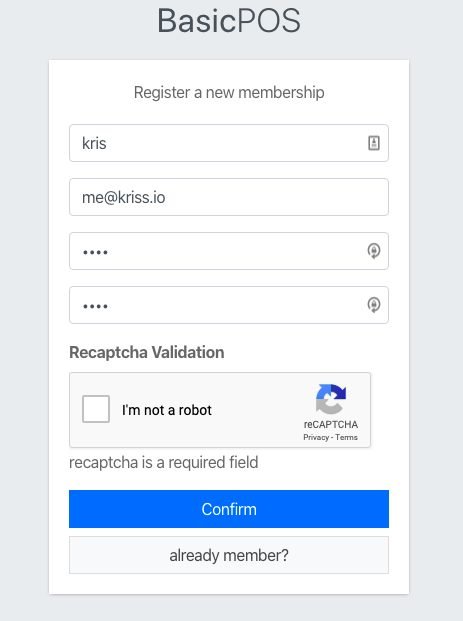
    this image show result when we didn't verify ReCaptcha
    ReCaptcha require validation

    The last thing is to push to GitHub which will also auto-deploy to Netlify

    Setup CORS protected backend

    Now we want to add whitelist IP or domain name to CORS option, open index.js on backend side then update CORS as seen in the image below;

    var allowedOrigins = ['http://localhost:3000',
                          'https://basicpos.netlify.com/'];
    app.use(cors({
      origin: function(origin, callback){
        // allow requests with no origin 
        // (like mobile apps or curl requests)
        if(!origin) return callback(null, true);
        if(allowedOrigins.indexOf(origin) === -1){
          var msg = 'The CORS policy for this site does not ' +
                    'allow access from the specified Origin.';
          return res.json({status:'error',msg});
        }
        return callback(null, true);
      }
    }));

    If an error occurs, try changing to another domain
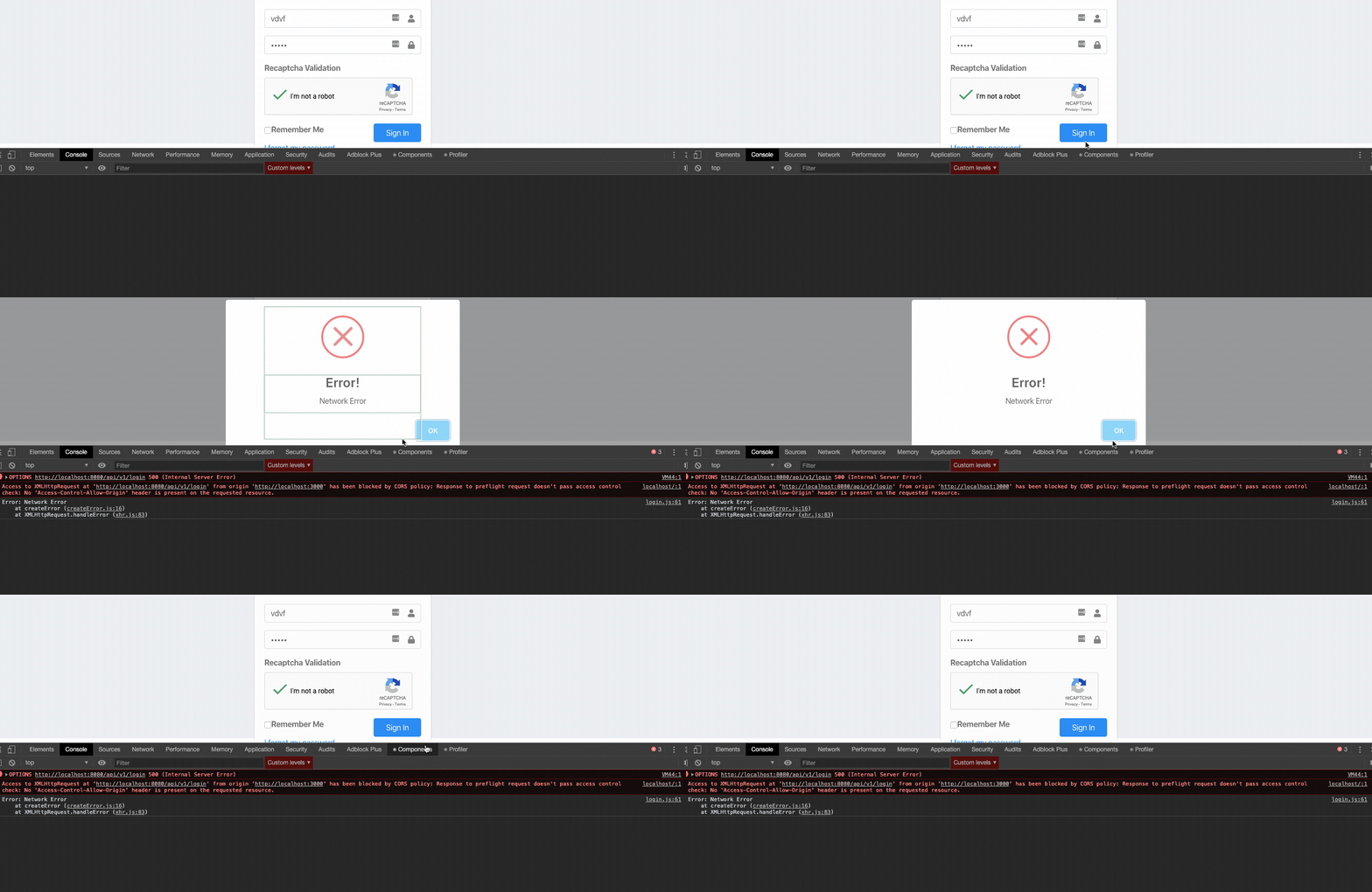
    display CORS error result
    CORS error result

    Now push the updated code to Github. Finally, we can now protect our backend from unknown request

    Conclusion

    In this chapter, we have learned how to make our apps safe on the internet by setting up Recaptcha on React and CORS on Express. next chapter we will add redux that make our app are solid foundation one last thing your will find code for this chapter on this backend branch and frontend branch


    Previous lessons:

    Create Simple POS With React, Node and MongoDB #4: Optimize App and Setup Deployment Workflow
    Create simple POS with React, Node and MongoDB #3: setup E-mail pipeline with add activate on SignUp
    Create simple POS with React, Node and MongoDB #2: Auth state, Logout, Update Profile
    Create a simple POS with React, Node and MongoDB #1: Register and Login with JWT

    Read More:  The Ultimate Guide to Drag and Drop Image Uploading with Pure JavaScript
    Share. Facebook Twitter Pinterest LinkedIn Tumblr Email
    Krissanawat Kaewsanmuang
    • Website
    • X (Twitter)

    Developer Relation @instamobile.io

    Related Posts

    Streamlining Resource Allocation for Enhanced Project Success

    December 18, 2024

    Conducting Effective Post-Project Evaluations: A Guide

    December 16, 2024

    Strategies for Keeping Projects on Track and Meeting Deadlines

    December 10, 2024
    Leave A Reply Cancel Reply

    You must be logged in to post a comment.

    Stay In Touch
    • Facebook
    • Twitter
    • Pinterest
    • Instagram
    • YouTube
    • Vimeo
    Don't Miss
    JavaScript November 28, 2024

    Maximizing Efficiency: Utilizing Project Dashboards for Progress Tracking

    Utilizing project dashboards enhances efficiency by providing real-time insights into progress and performance. These visual tools allow teams to track milestones, allocate resources effectively, and identify bottlenecks, ultimately driving project success.

    Monitoring your NestJS application with Sentry

    January 31, 2023

    Happy Programmer’s Day!

    September 12, 2016

    Building a Pokedex with Next.js

    January 12, 2021

    Categories

    • AI & Automation
    • Angular
    • ASP.NET
    • AWS
    • B2B Leads
    • Beginners
    • Blogs
    • Business Growth
    • Case Studies
    • Comics
    • Consultation
    • Content & Leadership
    • CSS
    • Development
    • Django
    • E-commerce & Retail
    • Entrepreneurs
    • Entrepreneurship
    • Events
    • Express.js
    • Facebook Ads
    • Finance & Fintech
    • Flask
    • Flutter
    • Franchising
    • Funnel Strategy
    • Git
    • GraphQL
    • Home Services Marketing
    • Influencer & Community
    • Interview
    • Java
    • Java Spring
    • JavaScript
    • Job
    • Laravel
    • Lead Generation
    • Legal & Compliance
    • LinkedIn
    • Machine Learning
    • Marketing Trends
    • Medical Marketing
    • MSP Lead Generation
    • MSP Marketing
    • NestJS
    • Next.js
    • Node.js
    • Node.js Lessons
    • Paid Advertising
    • PHP
    • Podcasts
    • POS Tutorial
    • Programming
    • Programming
    • Python
    • React
    • React Lessons
    • React Native
    • React Native Lessons
    • Recruitment
    • Remote Job
    • SaaS & Tech
    • SEO & Analytics
    • Soshace
    • Startups
    • Swarm Intelligence
    • Tips
    • Trends
    • Vue
    • Wiki
    • WordPress
    Top Posts

    Programming Patterns. Introduction

    Programming January 31, 2017

    Anime.js to MP4 and GIF with Node.js and FFMPEG

    Express.js April 25, 2023

    Build Real-World React Native App #4 : Content Placeholder

    React Native November 27, 2020

    13. Уроки Node.js. Разработка, supervisor

    Programming September 21, 2016

    Subscribe to Updates

    Get The Latest News, Updates, And Amazing Offers

    About Us
    About Us

    Soshace Digital delivers comprehensive web design and development solutions tailored to your business objectives. Your website will be meticulously designed and developed by our team of seasoned professionals, who combine creative expertise with technical excellence to transform your vision into a high-impact, user-centric digital experience that elevates your brand and drives measurable results.

    7901 4th St N, Suite 28690
    Saint Petersburg, FL 33702-4305
    Phone: 1(877)SOSHACE

    Facebook X (Twitter) Instagram Pinterest YouTube LinkedIn
    Our Picks
    Beginners

    Automating and Scheduling Tasks Using Python

    Programming

    Vagrant Tutorial

    Programming

    Уроки React. Урок 6.

    Most Popular

    Top 5 Free Website Builders in 2019

    Tips

    Developing the Proper Business Performance

    Entrepreneurs

    Leveraging Video Recruiting to Attract Top Talent Effectively

    Recruitment
    © 2026 Soshace Digital.
    • Home
    • About
    • Services
    • Contact Us
    • Privacy Policy
    • Terms & Conditions

    Type above and press Enter to search. Press Esc to cancel.