Close Menu
Soshace Digital Blog

    Subscribe to Updates

    Get The Latest News, Updates, And Amazing Offers

    What's Hot
    Programming

    16. Уроки Node.js. Событийный цикл, библиотека libUV. Часть 2.

    Entrepreneurship

    Enhancing Business Success: The Impact of Emotional Intelligence

    JavaScript

    Bootstrap your next Preact application with Bun

    Important Pages:
    • Home
    • About
    • Services
    • Contact Us
    • Privacy Policy
    • Terms & Conditions
    Facebook X (Twitter) Instagram LinkedIn YouTube
    Today's Picks:
    • Scaling Success: Monitoring Indexation of Programmatic SEO Content
    • Leveraging Influencers: Key Drivers in New Product Launches
    • How Privacy-First Marketing Will Transform the Industry Landscape
    • The Impact of Social Proof on Thought Leadership Marketing
    • Balancing Value-Driven Content and Promotional Messaging Strategies
    • Top Influencer Marketing Platforms to Explore in 2025
    • Emerging Trends in Marketing Automation and AI Tools for 2023
    • Strategies to Mitigate Duplicate Content in Programmatic SEO
    Thursday, November 27
    Facebook X (Twitter) Instagram LinkedIn YouTube
    Soshace Digital Blog
    • Home
    • About
    • Services
    • Contact Us
    • Privacy Policy
    • Terms & Conditions
    Services
    • SaaS & Tech

      Maximizing Efficiency: How SaaS Lowers IT Infrastructure Costs

      August 27, 2025

      Navigating Tomorrow: Innovations Shaping the Future of SaaS

      August 27, 2025

      Maximizing Impact: Strategies for SaaS & Technology Marketing

      August 27, 2025
    • AI & Automation

      Enhancing Customer Feedback Analysis Through AI Innovations

      August 27, 2025

      Navigating the Impact of AI on SEO and Search Rankings

      August 27, 2025

      5 Automation Hacks Every Home Service Business Needs to Know

      May 3, 2025
    • Finance & Fintech

      Critical Missteps in Finance Marketing: What to Avoid

      August 27, 2025

      Analyzing Future Fintech Marketing Trends: Insights Ahead

      August 27, 2025

      Navigating the Complex Landscape of Finance and Fintech Marketing

      August 27, 2025
    • Legal & Compliance

      Exploring Thought Leadership’s Impact on Legal Marketing

      August 27, 2025

      Maximizing LinkedIn: Strategies for Legal and Compliance Marketing

      August 27, 2025

      Why Transparency Matters in Legal Advertising Practices

      August 27, 2025
    • Medical Marketing

      Enhancing Online Reputation Management in Hospitals: A Guide

      August 27, 2025

      Analyzing Emerging Trends in Health and Medical Marketing

      August 27, 2025

      Exploring Innovative Content Ideas for Wellness Blogs and Clinics

      August 27, 2025
    • E-commerce & Retail

      Strategic Seasonal Campaign Concepts for Online and Retail Markets

      August 27, 2025

      Emerging Trends in E-commerce and Retail Marketing Strategies

      August 27, 2025

      Maximizing Revenue: The Advantages of Affiliate Marketing for E-Commerce

      August 27, 2025
    • Influencer & Community

      Leveraging Influencers: Key Drivers in New Product Launches

      August 27, 2025

      Top Influencer Marketing Platforms to Explore in 2025

      August 27, 2025

      Key Strategies for Successful Influencer Partnership Negotiations

      August 27, 2025
    • Content & Leadership

      The Impact of Social Proof on Thought Leadership Marketing

      August 27, 2025

      Balancing Value-Driven Content and Promotional Messaging Strategies

      August 27, 2025

      Analyzing Storytelling’s Impact on Content Marketing Effectiveness

      August 27, 2025
    • SEO & Analytics

      Scaling Success: Monitoring Indexation of Programmatic SEO Content

      August 27, 2025

      Strategies to Mitigate Duplicate Content in Programmatic SEO

      August 27, 2025

      Effective Data Visualization Techniques for SEO Reporting

      August 27, 2025
    • Marketing Trends

      How Privacy-First Marketing Will Transform the Industry Landscape

      August 27, 2025

      Emerging Trends in Marketing Automation and AI Tools for 2023

      August 27, 2025

      Maximizing ROI: Key Trends in Paid Social Advertising

      August 27, 2025
    Soshace Digital Blog
    Blog / JavaScript / React / React Native AsyncStorage Example: When I Die App
    JavaScript

    React Native AsyncStorage Example: When I Die App

    Krissanawat KaewsanmuangBy Krissanawat KaewsanmuangDecember 31, 2019Updated:May 26, 2024No Comments4 Mins Read
    Facebook Twitter Pinterest Telegram LinkedIn Tumblr Email Reddit
    React Native AsyncStorage Example: When I Die App
    React Native AsyncStorage Example: When I Die App
    Share
    Facebook Twitter LinkedIn Pinterest Email Copy Link
    React Native AsyncStorage Example: When I Die App
    React Native AsyncStorage Example: When I Die App

    AsyncStorage is the persistent storage in React native that is based on key-value pair storage. It is commonly used when we want to store some basic data like app settings. All values in AsyncStorage are stored as plain text since it does not support any other data type. In this post, we will learn the basics of using AsyncStorage in a React native app.

    Set up on Android and iOS

    We can add the async-storage package to our project using yarn.

    $ yarn add @react-native-community/async-storage

    Async-storage comes with the auto-linking feature for React native 0.60+.

    For iOS using cocoapods, run:

    $ cd ios/ && pod install

    We can now import the package to our project.

    import AsyncStorage from '@react-native-community/async-storage';

    Commonly Used Methods

    Here, we will discuss the four commonly used methods in AsyncStorage that follow the get and set principle.

    Store Data

    storeData = async () => {
      try {
        await AsyncStorage.setItem('random_time', 50000)
      } catch (e) {
        // saving error
      }
    }

    Get Data

    getData = async () => {
      try {
        const value = await AsyncStorage.getItem('random_time')
        if(value !== null) {
          // value previously stored
        }
      } catch(e) {
        // error reading value
      }
    }

    Delete Individual Key

    removeValue = async () => {
      try {
        await AsyncStorage.removeItem('random_time')
      } catch(e) {
        // remove error
      }
    
      console.log('Done.')
    }

    Clear All Data

    clearAll = async () => {
      try {
        await AsyncStorage.clear()
      } catch(e) {
        // clear error
      }
    
      console.log('Done.')
    }

    First Basic Example: When I Die App

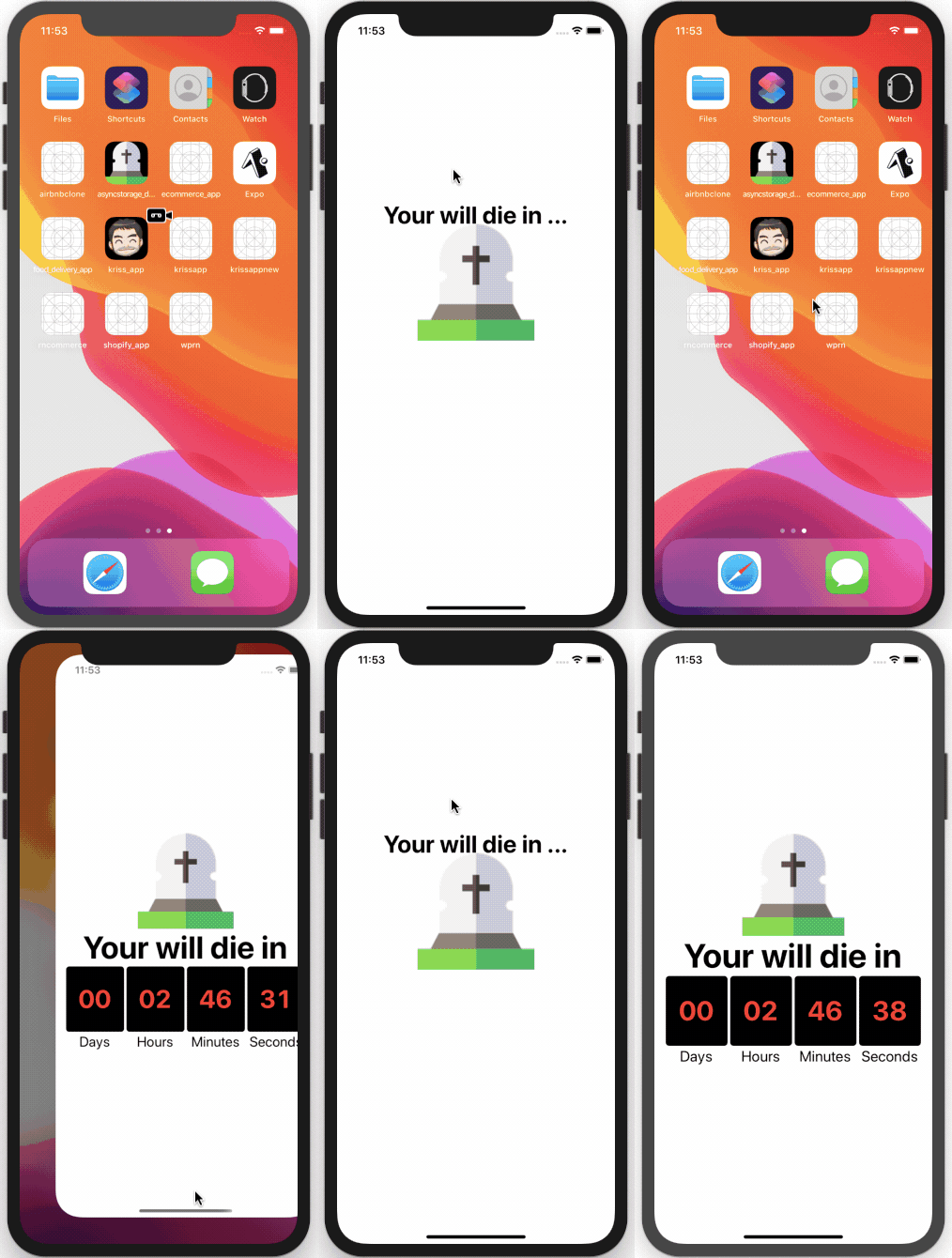
    Our app follows a simple idea. It uses some random time value that is set as a react-native-countdown-component. After the countdown is started, the current time will be stored in AsyncStorage when we close the app and the componentWillUnmount event fires. When we open the app again and componentDidMount event fires, the app will retrieve the counting down time value from AsyncStorage and continue.

    Read More:  Monthly Digest of the Most Popular JS Github Repositories

    Initialize New Project

    Using the VsCode integrated terminal, we can create a new react-native project using the following command.

    react-native init asyncstorage_demo

    To open the project, run:

    code asyncstorage_demo

    Now we need to add the two required packages, async-storage and react-native-countdown-component, using yarn.

    yarn add react-native-countdown-component @react-native-community/async-storage

    Bootstrap the App

    Import the installed packages to our project file, App.js.

    import CountDown from 'react-native-countdown-component';
    import AsyncStorage from '@react-native-community/async-storage';

    Define a new state for the component.

    export default class App extends Component {
        constructor(props) {
            super(props);
             this.state = {until_death: 10000}
          }
    ...............


    Render our component to show the countdown clock.

    return (
          <View style={styles.MainContainer}>
            <Image source={require('./img/grave.png')} />
            <Text style={styles.header}>Your will die in</Text>
    
            <CountDown
              until={this.state.until_death}
              onFinish={this.onDoneCountdown}
              onPress={this.onPressCountdown}
              size={40}
              digitStyle={{backgroundColor: 'black'}}
              digitTxtStyle={{color: 'red'}}
              onChange={until_death => this.setState({until_death: until_death})}
            />
          </View>
        );
      }

    If we closely inspect the code inside the render function, first we set the initial time.

    until={this.state.until_death}

    When the time changes, we set the state of until_death to the new value.

    onChange={until_death => this.setState({until_death: until_death})}

    Next, we should store the state when the user closes the app so that when the user opens the app again the countdown continues.

    storeData = async until_death => {
        try {
          await AsyncStorage.setItem('until_death', until_death);
        } catch (e) {
          console.log(e);
        }
      };

    The componentWillUnmount event fires when the user closes the app. We will call the storeData function when this event fires and sends the current state as a parameter.

    componentWillUnmount() {
        this.storeData(this.state.until_death);
      }

    Continue Count Down

    When the user opens the app again, getData function will retrieve the stored time. If the app is opened for the first time, it will initialize a random value for until_death and set the state of the app.

    getData = async () => {
        try {
          const until_death = await AsyncStorage.getItem('until_death');
          if (until_death !== null) {
            this.setState(until_death);
          } else {
            let until_death = Math.floor(Math.random() * 1000000) + 1;
            this.setState(until_death);
          }
        } catch (e) {
          console.log(e);
        }
      };

    When the user opens the app and the componentDidMount event fires, call the getData method to continue the countdown.

    componentDidMount() {
        SplashScreen.hide();
        this.getData();
      }

    Our final app now continues the countdown from where it left off.
    Read More:  Where to Hire Remote Developers

    Conclusion

    This post demonstrated the basics of using AsyncStorage in our app. Our current app does not continue the countdown in the background when the app closes. If you want to find out how to add this feature to our app, you can find the full source code here.

    Credit

    Icon made by Freepik from www.flaticon.com

    react-native-community/async-storage
    react native
    Share. Facebook Twitter Pinterest LinkedIn Tumblr Email
    Krissanawat Kaewsanmuang
    • Website
    • X (Twitter)

    Developer Relation @instamobile.io

    Related Posts

    Streamlining Resource Allocation for Enhanced Project Success

    December 18, 2024

    Conducting Effective Post-Project Evaluations: A Guide

    December 16, 2024

    Strategies for Keeping Projects on Track and Meeting Deadlines

    December 10, 2024
    Leave A Reply Cancel Reply

    You must be logged in to post a comment.

    Stay In Touch
    • Facebook
    • Twitter
    • Pinterest
    • Instagram
    • YouTube
    • Vimeo
    Don't Miss
    JavaScript December 19, 2019

    How to Architect a Node.Js Project from Ground Up?

    In this article, we will discuss how to architect a Node.js application properly, and why it is important. Also, we’ll look at what design decisions can lead us to in creating a successful digital product.

    Strategies for Identifying Quality LinkedIn Prospects by Niche

    December 7, 2024

    Top 9 Web Components UI Libraries

    December 7, 2019

    An Introduction to Finite State Machines: Simplifying React State Management with State Machines

    February 2, 2021

    Categories

    • AI & Automation
    • Angular
    • ASP.NET
    • AWS
    • B2B Leads
    • Beginners
    • Blogs
    • Business Growth
    • Case Studies
    • Comics
    • Consultation
    • Content & Leadership
    • CSS
    • Development
    • Django
    • E-commerce & Retail
    • Entrepreneurs
    • Entrepreneurship
    • Events
    • Express.js
    • Facebook Ads
    • Finance & Fintech
    • Flask
    • Flutter
    • Franchising
    • Funnel Strategy
    • Git
    • GraphQL
    • Home Services Marketing
    • Influencer & Community
    • Interview
    • Java
    • Java Spring
    • JavaScript
    • Job
    • Laravel
    • Lead Generation
    • Legal & Compliance
    • LinkedIn
    • Machine Learning
    • Marketing Trends
    • Medical Marketing
    • MSP Lead Generation
    • MSP Marketing
    • NestJS
    • Next.js
    • Node.js
    • Node.js Lessons
    • Paid Advertising
    • PHP
    • Podcasts
    • POS Tutorial
    • Programming
    • Programming
    • Python
    • React
    • React Lessons
    • React Native
    • React Native Lessons
    • Recruitment
    • Remote Job
    • SaaS & Tech
    • SEO & Analytics
    • Soshace
    • Startups
    • Swarm Intelligence
    • Tips
    • Trends
    • Vue
    • Wiki
    • WordPress
    Top Posts

    1. Уроки Node.js .Модули. Часть 1.

    Programming September 5, 2016

    Node.js Lesson 8: Inheritance from Errors, Error

    JavaScript October 28, 2020

    Effective Strategies for Managing Project Dependencies

    JavaScript November 24, 2024

    Optimizing Recruitment: Best Practices for Employers and Candidates

    Recruitment December 16, 2024

    Subscribe to Updates

    Get The Latest News, Updates, And Amazing Offers

    About Us
    About Us

    Soshace Digital delivers comprehensive web design and development solutions tailored to your business objectives. Your website will be meticulously designed and developed by our team of seasoned professionals, who combine creative expertise with technical excellence to transform your vision into a high-impact, user-centric digital experience that elevates your brand and drives measurable results.

    7901 4th St N, Suite 28690
    Saint Petersburg, FL 33702-4305
    Phone: 1(877)SOSHACE

    Facebook X (Twitter) Instagram Pinterest YouTube LinkedIn
    Our Picks
    Programming

    3. Уроки Express.js. Шаблонизация с EJS: Layout, Block, Partials

    Beginners

    The Ultimate Guide to Using GitHub Pages

    Programming

    14. Уроки Node.js. Отладка скриптов. Часть 1.

    Most Popular

    Agile Software Development, Scrum part 2

    JavaScript

    Conquering Imposter Syndrome: Empowering Startup Founders

    Startups

    Strategic Messaging: Cultivating Relationships with LinkedIn Prospects

    LinkedIn
    © 2025 Soshace Digital.
    • Home
    • About
    • Services
    • Contact Us
    • Privacy Policy
    • Terms & Conditions

    Type above and press Enter to search. Press Esc to cancel.