

Close Menu
Soshace Digital Blog

    Subscribe to Updates

    Get The Latest News, Updates, And Amazing Offers

    What's Hot
    JavaScript

    Filtering, Sorting and Pagination – Advanced Filtering with React and Redux

    Programming

    23. Node.js Lessons. Domains, asynchronous try.. catch. Part 1.

    JavaScript

    Tempor Nec Feugiat Nislpretium Fusce Platea Dictumst

    Important Pages:
    • Home
    • About
    • Services
    • Contact Us
    • Privacy Policy
    • Terms & Conditions
    Facebook X (Twitter) Instagram LinkedIn YouTube
    Today's Picks:
    • Scaling Success: Monitoring Indexation of Programmatic SEO Content
    • Leveraging Influencers: Key Drivers in New Product Launches
    • How Privacy-First Marketing Will Transform the Industry Landscape
    • The Impact of Social Proof on Thought Leadership Marketing
    • Balancing Value-Driven Content and Promotional Messaging Strategies
    • Top Influencer Marketing Platforms to Explore in 2025
    • Emerging Trends in Marketing Automation and AI Tools for 2023
    • Strategies to Mitigate Duplicate Content in Programmatic SEO
    Wednesday, January 21
    Facebook X (Twitter) Instagram LinkedIn YouTube
    Soshace Digital Blog
    • Home
    • About
    • Services
    • Contact Us
    • Privacy Policy
    • Terms & Conditions
    Services
    • SaaS & Tech

      Maximizing Efficiency: How SaaS Lowers IT Infrastructure Costs

      August 27, 2025

      Navigating Tomorrow: Innovations Shaping the Future of SaaS

      August 27, 2025

      Maximizing Impact: Strategies for SaaS & Technology Marketing

      August 27, 2025
    • AI & Automation

      Enhancing Customer Feedback Analysis Through AI Innovations

      August 27, 2025

      Navigating the Impact of AI on SEO and Search Rankings

      August 27, 2025

      5 Automation Hacks Every Home Service Business Needs to Know

      May 3, 2025
    • Finance & Fintech

      Critical Missteps in Finance Marketing: What to Avoid

      August 27, 2025

      Analyzing Future Fintech Marketing Trends: Insights Ahead

      August 27, 2025

      Navigating the Complex Landscape of Finance and Fintech Marketing

      August 27, 2025
    • Legal & Compliance

      Exploring Thought Leadership’s Impact on Legal Marketing

      August 27, 2025

      Maximizing LinkedIn: Strategies for Legal and Compliance Marketing

      August 27, 2025

      Why Transparency Matters in Legal Advertising Practices

      August 27, 2025
    • Medical Marketing

      Enhancing Online Reputation Management in Hospitals: A Guide

      August 27, 2025

      Analyzing Emerging Trends in Health and Medical Marketing

      August 27, 2025

      Exploring Innovative Content Ideas for Wellness Blogs and Clinics

      August 27, 2025
    • E-commerce & Retail

      Strategic Seasonal Campaign Concepts for Online and Retail Markets

      August 27, 2025

      Emerging Trends in E-commerce and Retail Marketing Strategies

      August 27, 2025

      Maximizing Revenue: The Advantages of Affiliate Marketing for E-Commerce

      August 27, 2025
    • Influencer & Community

      Leveraging Influencers: Key Drivers in New Product Launches

      August 27, 2025

      Top Influencer Marketing Platforms to Explore in 2025

      August 27, 2025

      Key Strategies for Successful Influencer Partnership Negotiations

      August 27, 2025
    • Content & Leadership

      The Impact of Social Proof on Thought Leadership Marketing

      August 27, 2025

      Balancing Value-Driven Content and Promotional Messaging Strategies

      August 27, 2025

      Analyzing Storytelling’s Impact on Content Marketing Effectiveness

      August 27, 2025
    • SEO & Analytics

      Scaling Success: Monitoring Indexation of Programmatic SEO Content

      August 27, 2025

      Strategies to Mitigate Duplicate Content in Programmatic SEO

      August 27, 2025

      Effective Data Visualization Techniques for SEO Reporting

      August 27, 2025
    • Marketing Trends

      How Privacy-First Marketing Will Transform the Industry Landscape

      August 27, 2025

      Emerging Trends in Marketing Automation and AI Tools for 2023

      August 27, 2025

      Maximizing ROI: Key Trends in Paid Social Advertising

      August 27, 2025
    Soshace Digital Blog
    Blog / Programming / 3. Express.js Lessons. Templating with EJS: Layout, Block, Partials
    Programming

    3. Express.js Lessons. Templating with EJS: Layout, Block, Partials

    Ivan RastvorovBy Ivan RastvorovDecember 16, 2016Updated:April 5, 2019No Comments5 Mins Read
    Facebook Twitter Pinterest Telegram LinkedIn Tumblr Email Reddit
    3. Express.js Lessons. Templating with EJS: Layout, Block, Partials
    Share
    Facebook Twitter LinkedIn Pinterest Email Copy Link

    flight-bangkok0816

    In real life we generally have more than one template. Moreover, if we create a website with several pages, it usually happens that a number of them are of the same design. The template systems should consider this aspect. Unfortunately, ejs doesn’t deal very well with this task. That’s why we are going to install a different templating system named ejs-locals(let us add it to app.js):

    app.engine('ejs', require('ejs-locals'));
    app.set('views', __dirname + '/templates');
    app.set('view engine', 'ejs');

    This is almost the same as ejs, but with a number of essential opportunities, such as layout, block, partials. Let us look at them now.

    Install the module:

    npm i ejs-locals

    We’ve used the directive app.engine to inform Express that “files with this extension need to be handled by the template engine  require('ejs-locals') instead of standard ejs.”

    Once more we draw your attention to the fact that there are many great temlating systems in Node.js. Here we use ejs just because it really resembles HTML and requires minimum time for studying.

    Look for the template in template/index.ejs , now it will look like:

    <p class="lead">Hey all!</p>

    Further let us create  template/layout/page.ejs with this code:

    <!DOCTYPE html>
    <html>
    <head>
        <title><%=blocks.title%></title>
    
        <link rel="stylesheet" href="/vendor/bower_components/bootstrap/dist/css/bootstrap.css"/>
        <link rel="stylesheet" href="/css/app.css"/>
    
        <script src="/vendor/bower_components/jquery/jquery.js"></script>
        <script src="/vendor/bower_components/bootstrap/dist/js/bootstrap.js"></script>
    </head>
    <body>
    <header>
        <%-blocks.header%>
    </header>
    <section class="container">
    
        <%-partial('../partials/topNavigation')%>
    
        <h1><%=blocks.title%></h1>
    
        <%-body -%>
    </section>
    <footer>
        <%-blocks.footer%>
    </footer>
    </body>
    </html>

    Layout is some formatting that we insert into a separate file and specify, where we should insert body( <%-body -%>). In any other template we can indicate this. For example, in template/index.ejs we will write:

    <% layout('/layout/page') -%>
    
    <p class="lead">Hey all!</p>

    So, while handling this template, ejs will upload layout/page, output it, and the body  template/index.ejs will be put into template/layout/page.ejs:

    <%-body -%>

    So, if we’ve got a lot of pages of the same design, we can just show layout to them. The path is better to be shown this way for the correct work of Windows. 

    We put a slash, but you can ignore it as well:

    <% layout('layout/page') %>

    It simply means, the first line feed following the directory needs to be ignored. It is sometimes quite handy in order to avoid extra line feeds that turn into spaces in HTML. But in this case, it is not that vital.

    Read More:  How I Built an Admin Dashboard with Python Flask

    Let us take a look at page.ejs once more. Here we use Bootstrap and jQuery libraries. In order to put them properly, let us globally install the module

    npm i –g bower

    ‘Bower’ is an utility that allows you to install various front-end libraries seamlessly. Вootstrap and jQuery  will be installed in the public directory:

    cd public

    let us create here a special subdirectory vendor:

    mkdir vendor

    It won’t contain our JavaScript and CSS, but third-party ones:

    cd vendor

    and then let us install:

    bower i jquery bootstrap

    The directory appeared, but IDE is still showing the files are not found. It happens because it doesn’t know where to find them. Let us edit the settings.
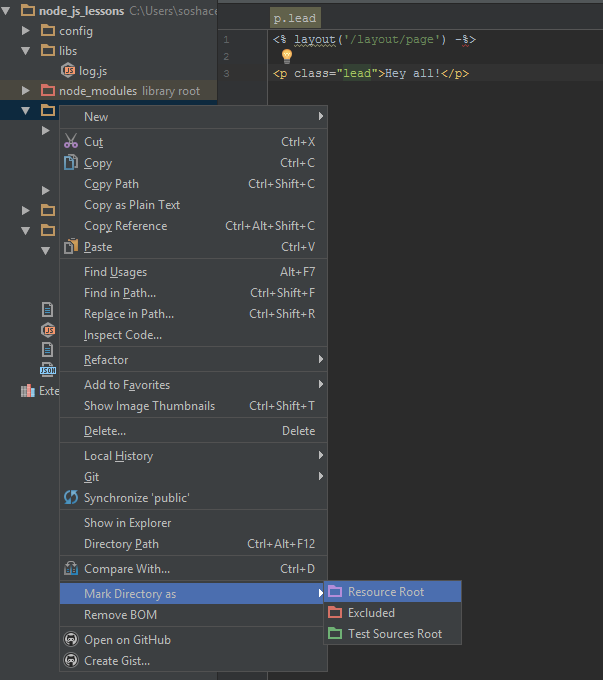
    root

    Everything’s ok with the files now.

    Let us create app.css in the directory public/css/app.css

    The next thing we need to look at here is the system of blocks.

    <title><%=blocks.title%></title>
    

    Let us imagine, we want to create something out of our template index.ejs that we will need, in particular, in layout. For example, a page header. I want to see a header that is not global for layout within page.ejs , in title , i.e. it can be different and is created strictly in the template. How can I do this? For that task, I’ve got blocks:

    <% block('title', 'Hello ≥︺‿︺≤'); -%><br>

    Further the template will care about the text, which will be added to a certain variable accessible through: blocks.title.

    Here (template/layout/page.ejs) we’ve made it in the way for the whole content of this variable %= is to be shielded, which means the symbols get changed for special HTML elements. And if we want to have the same view, we can put %-blocks….

    Read More:  TOP Most In-Demand IT Certifications 2020

    We will also need to create topNavigation.ejs within the directory templates/partialsj, and we will talk about  partials a little bit later:

    <nav class="navbar navbar-default" role="navigation">
        <ul class="nav navbar-nav">
            <li><a href="/">Main</a></li>
        </ul>
        <ul class="nav navbar-nav navbar-right">
            <li><a href="/login">Enter</a></li>
        </ul>
    </nav>

    Ok, let’s see. Launch it. Follow:

    http://localhost:3000/

    It’s perfect!

    So, the blocks are used where we need to insert some content into templates just because it would be unnecessary in JavaScript.

    The last component of the templating system we will study is partials. It is contained in our  page.ejs . It is a sub-template put into a separate file:

    <%-partial('../partials/topNavigation')%>

    Here you can find various options that may be transferred to this template. If it is interesting for you, you can find them in our supporting materials. There you can find a more detailed description of these features. In our case, you can treat partials as a simple addition, connection of one template to another.

    Further we will add various components to the template structure. The only thing we need to change right now is a variable body:

    <%-body -%>

    Here we use the templating mechanism, so you cannot put it here (app.js):

    app.get('/', function(req, res, next) {
      res.render("index", {
      });
    });

    If you leave it here, it won’t work correctly and our message won’t be outputted (templates/index.ejs):

    <p class="lead">Hey all!</p>

    To make everything work well, just move it from there. So, that’s it. Next time we will talk about MongoDB.

    The lesson code can be found here.

    sunset-palms-wallpaper-1

    The materials of this article were borrowed from the following screencast.

    We are looking forward to meeting you on our website blog.soshace.com

    Share. Facebook Twitter Pinterest LinkedIn Tumblr Email
    Ivan Rastvorov
    • Website

    Related Posts

    Mastering REST APIs: Essential Techniques for Programmers

    December 18, 2024

    Crafting Interactive User Interfaces Using JavaScript Techniques

    December 17, 2024

    Effective Strategies for Utilizing Frameworks in Web Development

    December 16, 2024
    Leave A Reply Cancel Reply

    You must be logged in to post a comment.

    Stay In Touch
    • Facebook
    • Twitter
    • Pinterest
    • Instagram
    • YouTube
    • Vimeo
    Don't Miss
    Flutter April 23, 2020

    React Native vs. Flutter: Which One Would Suit You Better?

    Unveiling pros and cons of such cross-platform development frameworks as Flutter and React Native. Discover what suits you better.

    Handling GraphQL API Authentication using Auth0 with Hasura Actions

    March 4, 2021

    3 Proven Strategies to Find Work-Life Balance for Remote Workers

    March 1, 2019

    Essential Steps for Crafting a Comprehensive Project Charter

    December 6, 2024

    Categories

    • AI & Automation
    • Angular
    • ASP.NET
    • AWS
    • B2B Leads
    • Beginners
    • Blogs
    • Business Growth
    • Case Studies
    • Comics
    • Consultation
    • Content & Leadership
    • CSS
    • Development
    • Django
    • E-commerce & Retail
    • Entrepreneurs
    • Entrepreneurship
    • Events
    • Express.js
    • Facebook Ads
    • Finance & Fintech
    • Flask
    • Flutter
    • Franchising
    • Funnel Strategy
    • Git
    • GraphQL
    • Home Services Marketing
    • Influencer & Community
    • Interview
    • Java
    • Java Spring
    • JavaScript
    • Job
    • Laravel
    • Lead Generation
    • Legal & Compliance
    • LinkedIn
    • Machine Learning
    • Marketing Trends
    • Medical Marketing
    • MSP Lead Generation
    • MSP Marketing
    • NestJS
    • Next.js
    • Node.js
    • Node.js Lessons
    • Paid Advertising
    • PHP
    • Podcasts
    • POS Tutorial
    • Programming
    • Programming
    • Python
    • React
    • React Lessons
    • React Native
    • React Native Lessons
    • Recruitment
    • Remote Job
    • SaaS & Tech
    • SEO & Analytics
    • Soshace
    • Startups
    • Swarm Intelligence
    • Tips
    • Trends
    • Vue
    • Wiki
    • WordPress
    Top Posts

    Top 3 Myths About Remote Web Developers

    JavaScript October 25, 2018

    Minimize Downtime by Creating a Health-check for Your NodeJS Application

    JavaScript September 23, 2020

    Soshace Becomes an Informational Partner of NodeUkraine 2019

    Events May 14, 2019

    Overview of FREE Python Programming Courses for Beginners

    Beginners September 9, 2019

    Subscribe to Updates

    Get The Latest News, Updates, And Amazing Offers

    About Us
    About Us

    Soshace Digital delivers comprehensive web design and development solutions tailored to your business objectives. Your website will be meticulously designed and developed by our team of seasoned professionals, who combine creative expertise with technical excellence to transform your vision into a high-impact, user-centric digital experience that elevates your brand and drives measurable results.

    7901 4th St N, Suite 28690
    Saint Petersburg, FL 33702-4305
    Phone: 1(877)SOSHACE

    Facebook X (Twitter) Instagram Pinterest YouTube LinkedIn
    Our Picks
    Development

    Enhancing Development Quality Through Effective Code Reviews

    Beginners

    Public Speaking for Developers Demystified: Tips & Tricks

    Programming

    Programming Patterns. Strategy, Observer, Iterator

    Most Popular

    Strategies for Effectively Discussing Weaknesses in Interviews

    Interview

    All You Should Know About Web Development in 2020 [Trends]

    Trends

    Build a Python Command-line Program Using OOP

    Python
    © 2026 Soshace Digital.
    • Home
    • About
    • Services
    • Contact Us
    • Privacy Policy
    • Terms & Conditions

    Type above and press Enter to search. Press Esc to cancel.