


Close Menu
Soshace Digital Blog

    Subscribe to Updates

    Get The Latest News, Updates, And Amazing Offers

    What's Hot
    Beginners

    Everything You Wanted to Know about the UX Research Methods

    Programming

    Your New Project on Angular

    JavaScript

    Automated Postgresql Backups with NodeJS and Bash

    Important Pages:
    • Home
    • About
    • Services
    • Contact Us
    • Privacy Policy
    • Terms & Conditions
    Facebook X (Twitter) Instagram LinkedIn YouTube
    Today's Picks:
    • Scaling Success: Monitoring Indexation of Programmatic SEO Content
    • Leveraging Influencers: Key Drivers in New Product Launches
    • How Privacy-First Marketing Will Transform the Industry Landscape
    • The Impact of Social Proof on Thought Leadership Marketing
    • Balancing Value-Driven Content and Promotional Messaging Strategies
    • Top Influencer Marketing Platforms to Explore in 2025
    • Emerging Trends in Marketing Automation and AI Tools for 2023
    • Strategies to Mitigate Duplicate Content in Programmatic SEO
    Thursday, November 27
    Facebook X (Twitter) Instagram LinkedIn YouTube
    Soshace Digital Blog
    • Home
    • About
    • Services
    • Contact Us
    • Privacy Policy
    • Terms & Conditions
    Services
    • SaaS & Tech

      Maximizing Efficiency: How SaaS Lowers IT Infrastructure Costs

      August 27, 2025

      Navigating Tomorrow: Innovations Shaping the Future of SaaS

      August 27, 2025

      Maximizing Impact: Strategies for SaaS & Technology Marketing

      August 27, 2025
    • AI & Automation

      Enhancing Customer Feedback Analysis Through AI Innovations

      August 27, 2025

      Navigating the Impact of AI on SEO and Search Rankings

      August 27, 2025

      5 Automation Hacks Every Home Service Business Needs to Know

      May 3, 2025
    • Finance & Fintech

      Critical Missteps in Finance Marketing: What to Avoid

      August 27, 2025

      Analyzing Future Fintech Marketing Trends: Insights Ahead

      August 27, 2025

      Navigating the Complex Landscape of Finance and Fintech Marketing

      August 27, 2025
    • Legal & Compliance

      Exploring Thought Leadership’s Impact on Legal Marketing

      August 27, 2025

      Maximizing LinkedIn: Strategies for Legal and Compliance Marketing

      August 27, 2025

      Why Transparency Matters in Legal Advertising Practices

      August 27, 2025
    • Medical Marketing

      Enhancing Online Reputation Management in Hospitals: A Guide

      August 27, 2025

      Analyzing Emerging Trends in Health and Medical Marketing

      August 27, 2025

      Exploring Innovative Content Ideas for Wellness Blogs and Clinics

      August 27, 2025
    • E-commerce & Retail

      Strategic Seasonal Campaign Concepts for Online and Retail Markets

      August 27, 2025

      Emerging Trends in E-commerce and Retail Marketing Strategies

      August 27, 2025

      Maximizing Revenue: The Advantages of Affiliate Marketing for E-Commerce

      August 27, 2025
    • Influencer & Community

      Leveraging Influencers: Key Drivers in New Product Launches

      August 27, 2025

      Top Influencer Marketing Platforms to Explore in 2025

      August 27, 2025

      Key Strategies for Successful Influencer Partnership Negotiations

      August 27, 2025
    • Content & Leadership

      The Impact of Social Proof on Thought Leadership Marketing

      August 27, 2025

      Balancing Value-Driven Content and Promotional Messaging Strategies

      August 27, 2025

      Analyzing Storytelling’s Impact on Content Marketing Effectiveness

      August 27, 2025
    • SEO & Analytics

      Scaling Success: Monitoring Indexation of Programmatic SEO Content

      August 27, 2025

      Strategies to Mitigate Duplicate Content in Programmatic SEO

      August 27, 2025

      Effective Data Visualization Techniques for SEO Reporting

      August 27, 2025
    • Marketing Trends

      How Privacy-First Marketing Will Transform the Industry Landscape

      August 27, 2025

      Emerging Trends in Marketing Automation and AI Tools for 2023

      August 27, 2025

      Maximizing ROI: Key Trends in Paid Social Advertising

      August 27, 2025
    Soshace Digital Blog
    Blog / Beginners / The Full Guide to the New Excel XLOOKUP Function
    Beginners

    The Full Guide to the New Excel XLOOKUP Function

    beatrix.potter89By beatrix.potter89February 1, 2020No Comments8 Mins Read
    Facebook Twitter Pinterest Telegram LinkedIn Tumblr Email Reddit
    The Full Guide to the New Excel XLOOKUP Function
    The Full Guide to the New Excel XLOOKUP Function
    Share
    Facebook Twitter LinkedIn Pinterest Email Copy Link
    The Full Guide to the New Excel XLOOKUP Function I
    The Full Guide to the New Excel XLOOKUP Function I

    Microsoft recently announced that XLOOKUP would be the new replacement for VLOOKUP. Although it may have taken many years to get to this point, Excel users now have a new function that is much more user-friendly and avoids some frustrating VLOOKUP mistakes. There are still some drawbacks with the new XLOOKUP, so let’s dive right into the function now.

    What is XLOOKUP?

    This is a function that will find a value in a row (column) and return a value from a column (row) that’s adjacent if a match is found. It operates under the same principle as VLOOKUP but it has some new features.

    The XLOOKUP signature (argument) for Excel is as follows:

    =XLOOKUP(lookup_value, lookup_array, return_array, [match_mode], [search_mode])

    It might look a bit intimidating at first glance, but you really only need to complete the first three values. The last two, which are in square brackets, are optional arguments.

    In fact, having only 3 integral arguments, XLOOKUP is far less intimidating to learn and come to terms with than the other LOOKUP functions.

    How do XLOOKUP and VLOOKUP Work?

    With VLOOKUP, merely typing the function takes some time since it has 4 mandatory arguments. On top of this, the output may still not be correct because if you insert or remove columns, the 3rd argument’s index isn’t automatically updated. As well as this, the 4th argument can give output values that don’t match the lookup value if you’re using TRUE mode. Another drawback is, VLOOKUP always takes a long time to calculate. It is not unheard of for a VLOOKUP calculation to take over half an hour if many rows are involved.

    However, VLOOKUP’s drawbacks have their workarounds. For example, if you use INDEX and MATCH, the index used in the 3rd argument will then automatically update. As well, VLOOKUP’s calculation speed increases greatly if you use the Double VLOOKUP Trick – we have covered this in another post.
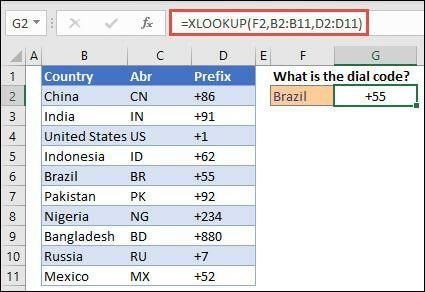
    XLOOKUP is used in G2
    XLOOKUP is in G2

    In the above example, XLOOKUP is used in G2 to display a country code based on the user input in F2.

    With XLOOKUP, there are 3 main arguments – the lookup_value, the lookup_array, and the return_array. The first argument, lookup_value, is just for the value you’re searching for, but the lookup_array allows you to set the range you’re searching. The last important argument, return_array, lets you choose the range to return. But as well as these, the optional arguments [if_not_found], [match_mode] and [search_mode] allow you to set your own error message if no valid match is found, rather than showing #N/A, and allow you to specify the match type and search mode – with [match_mode], 0 is exact match with #N/A returned if none is found, -1 is exact match which returns the next smaller item if none is found, 1 is exact match which returns the next larger item if none is found and 2 is a wildcard match with special meaning for * ? and ~. Whereas with [search_mode], 1 searches beginning at the first item, -1 searches beginning at the last item, 2 searches a lookup_array sorted in ascending order and -2 searches a lookup_array sorted in descending order. The results returned will be invalid if the array is not sorted appropriately.
    Read More:  WordPress for Non-Programmers: Introduction to the Web Development World
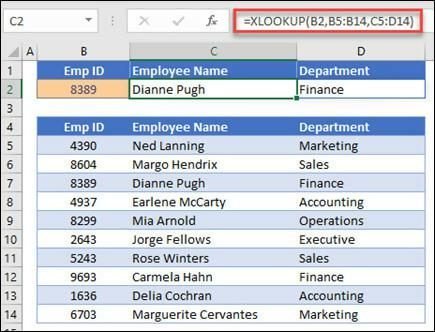
    XLOOKUP for search and display an employee’s information based on their ID
    XLOOKUP for search and display an employee’s information based on their ID

    In the above example, XLOOKUP is being used to search for and display an employee’s information based on their ID. XLOOKUP can display all the employee’s data because of its ability to return arrays with multiple items.
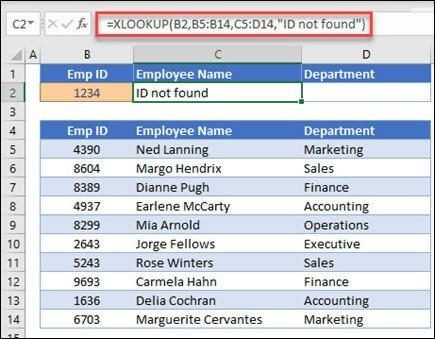
    if_not_found argument
    if_not_found argument

    Above, the if_not_found argument is used, to add a custom error message.
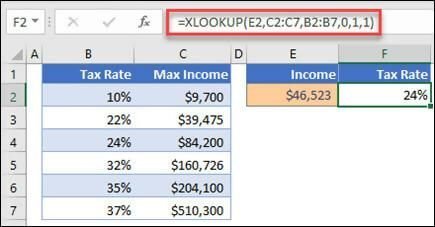
    match_mode
    match_mode

    Above, the match_mode argument is used, set to 1, so it’s looking for an exact match or the next larger item. The search_mode argument is also used, set to 1, so searching starting from the first item down to the last.
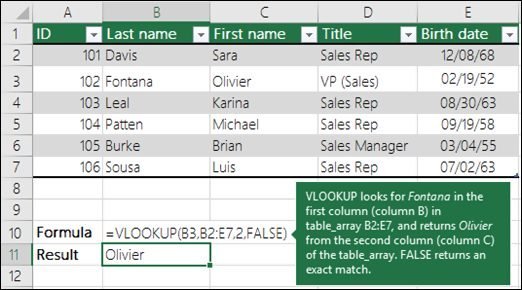
    VLOOKUP in comparison
    VLOOKUP in comparison

    Here is VLOOKUP in comparison, with the three mandatory lookup_value, Table_array, and col_index_num arguments.
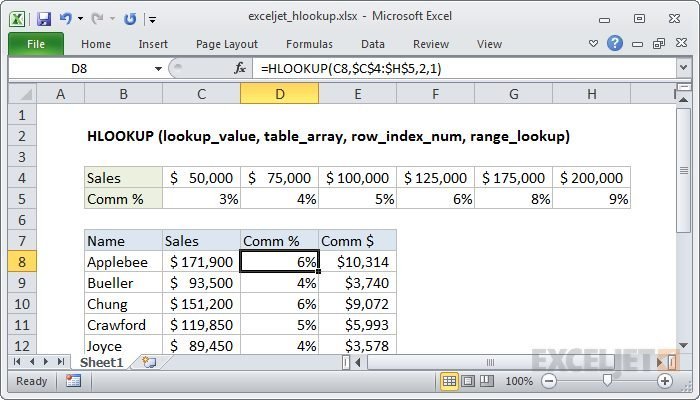
    HLOOKUP
    HLOOKUP

    Here is HLOOKUP as well, with lookup_value, table_array, row_index_num and range_lookup.

    XLOOKUP vs. VLOOKUP (and HLOOKUP)

    There are four critical differences between the two functions. The first is that there are two different arguments for the lookup and the return arrays. This is the same way that INDEX MATCH functions. VLOOKUP only has a single table array that has the column to look in as well as the return column. This can create problems in our formulas when inserting or deleting columns in the range. XLOOKUP doesn’t have that problem because the lookup and return ranges are split in different values.

    Another main difference is the default to the exact match. VLOOKUP has to be an exact match so the last argument always has to be FALSE or zero. But with XLOOKUP, you only have to note three arguments to lookup an exact match because that’s the default mode. XLOOKUP allows the user to do approximate matches or use wildcard characters.
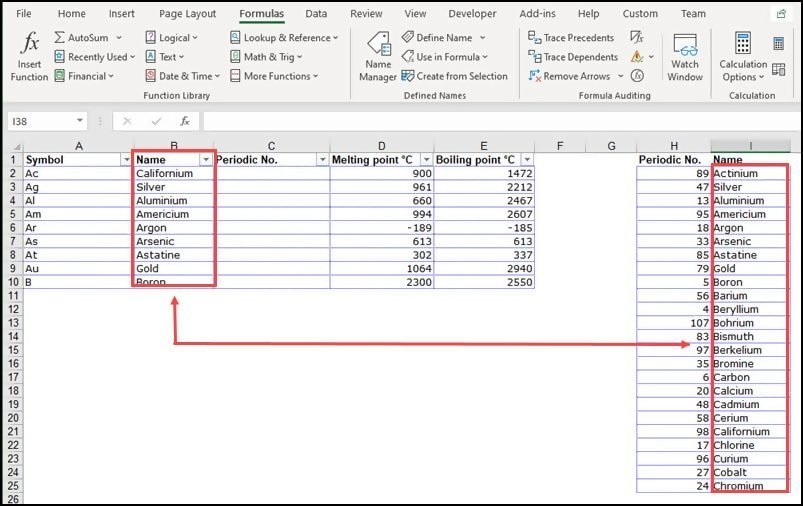
    Example
    Example

    The third main difference is that XLOOKUP can run horizontal lookups without using a different function like HLOOKUP. Instead, specify single rows instead of columns for return and lookup arrays. Last but not least, you can use XLOOKUP to return a value to the left or above of the lookup range, which wasn’t possible previously with VLOOKUP.

    Other XLOOKUP Features

    XLOOKUP at first glance seems very close to the INDEX MATCH function. The main difference is that the lookup can be done through the singular function of XLOOKUP instead of two functions in INDEX MATCH. Microsoft has gone beyond INDEX MATCH though, to add extra useful features to XLOOKUP.

    Read More:  UX Engineers and the Skills They Need

    1. Wildcards
    The fourth argument in XLOOKUP is the optional [match_mode]. This one has four options, the first three of which are similar to MATCH function (exact match, less than, or greater than). The fourth option is the wildcard character. This helps you run partial match lookups, which is extremely helpful. XLOOKUP lets you use the asterisk (*) or question mark (?) character in the lookup value as a wildcard. The asterisk stands for any number of characters whereas the question mark represents any single character.
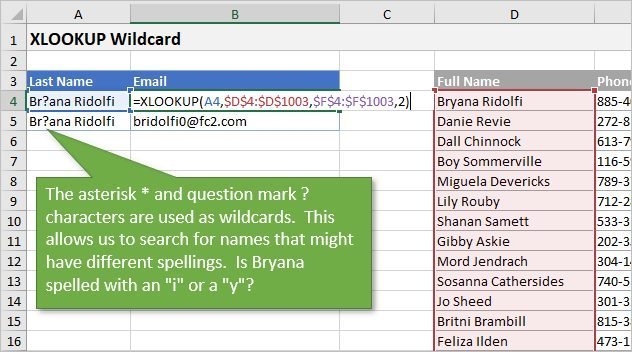
    XLOOKUP Wildcard
    XLOOKUP Wildcard

    If you look for either of those things, you can put a tilde character ~ in front of the search character, then specify a 2 for the argument to turn on wildcard character match. This is excellent especially in tables where there may be misspelled names.

    2. Reverse Order Search
    You can also run a reverse-order search, which is an optional argument in fifth, the [search_mode]. The default is 1 to search in first-to-last order, but you can now specify -1 to search from last-to-first. The search will run in reverse order, either bottom to top or right to left. This is very useful for looking up the last time an item comes up in a list and finding a matching result, but there are many more use cases where this function will be a life-saver.

    The Downsides
    We spoke in-depth about the benefits of XLOOKUP and how it has major advantages, including the default to exact match, the three arguments required, its multi-direction functionality and one function instead of two, the wildcard characters, and reverse lookups. There are also drawbacks though which must be mentioned in this guide.

    The first one is that new users might find the optional arguments to be overwhelming in the function. If the lookup and return arrays are not of the same length, you will get a #VALUE! error which can be problematic. Some users can also find it quite time-consuming to pick the two ranges with the click of a mouse, especially for large tables.

    All that being said, there are some great new features that make this tool well worth it. It’s now only available to Office 365 subscribers. It’s unfortunately not backward compatible so you can only send your XLOOKUP files to people on Office 365 with that build supporting XLOOKUP function.


    Beatrix Potter writes for Paper Fellows and Business Writing Service UK on matters of software development and business. She enjoys writing tech hacks. Beatrix also writes articles for Essay Assignment Help in her role as a tutor.

    excel VLOOKUP XLOOKUP
    Share. Facebook Twitter Pinterest LinkedIn Tumblr Email
    beatrix.potter89

      Related Posts

      The Ultimate Guide to Pip

      June 12, 2023

      Build Real-world React Native App #0: Overview & Requirement

      November 6, 2020

      How to implement WPF Canvas? Explain with an example

      November 4, 2020
      Leave A Reply Cancel Reply

      You must be logged in to post a comment.

      Stay In Touch
      • Facebook
      • Twitter
      • Pinterest
      • Instagram
      • YouTube
      • Vimeo
      Don't Miss
      Tips December 7, 2019

      Top 9 Web Components UI Libraries

      Best web component libraries that are available today and that will be prominent in 2020 and after.

      Tough Interview

      November 21, 2016

      Vagrant Tutorial #part 2

      March 9, 2017

      The Critical Role of Code Reviews in Software Development

      November 30, 2024

      Categories

      • AI & Automation
      • Angular
      • ASP.NET
      • AWS
      • B2B Leads
      • Beginners
      • Blogs
      • Business Growth
      • Case Studies
      • Comics
      • Consultation
      • Content & Leadership
      • CSS
      • Development
      • Django
      • E-commerce & Retail
      • Entrepreneurs
      • Entrepreneurship
      • Events
      • Express.js
      • Facebook Ads
      • Finance & Fintech
      • Flask
      • Flutter
      • Franchising
      • Funnel Strategy
      • Git
      • GraphQL
      • Home Services Marketing
      • Influencer & Community
      • Interview
      • Java
      • Java Spring
      • JavaScript
      • Job
      • Laravel
      • Lead Generation
      • Legal & Compliance
      • LinkedIn
      • Machine Learning
      • Marketing Trends
      • Medical Marketing
      • MSP Lead Generation
      • MSP Marketing
      • NestJS
      • Next.js
      • Node.js
      • Node.js Lessons
      • Paid Advertising
      • PHP
      • Podcasts
      • POS Tutorial
      • Programming
      • Programming
      • Python
      • React
      • React Lessons
      • React Native
      • React Native Lessons
      • Recruitment
      • Remote Job
      • SaaS & Tech
      • SEO & Analytics
      • Soshace
      • Startups
      • Swarm Intelligence
      • Tips
      • Trends
      • Vue
      • Wiki
      • WordPress
      Top Posts

      Create simple POS with React.js, Node.js, and MongoDB #17: Stat screen

      JavaScript October 23, 2020

      Build Real-world React Native App #0: Overview & Requirement

      Beginners November 6, 2020

      Effective Strategies for B2B Lead Generation with Paid Ads

      B2B Leads December 16, 2024

      Optimizing Recruitment: Best Practices for Employers and Candidates

      Recruitment December 16, 2024

      Subscribe to Updates

      Get The Latest News, Updates, And Amazing Offers

      About Us
      About Us

      Soshace Digital delivers comprehensive web design and development solutions tailored to your business objectives. Your website will be meticulously designed and developed by our team of seasoned professionals, who combine creative expertise with technical excellence to transform your vision into a high-impact, user-centric digital experience that elevates your brand and drives measurable results.

      7901 4th St N, Suite 28690
      Saint Petersburg, FL 33702-4305
      Phone: 1(877)SOSHACE

      Facebook X (Twitter) Instagram Pinterest YouTube LinkedIn
      Our Picks
      JavaScript

      React Lesson 11. Pt.2: Redux Middlewares

      JavaScript

      Swarm Intelligence: Infusoria Slipper

      Events

      Google I/O 2019: New JavaScript Features

      Most Popular

      Think Like a Pythonista — Building a Book Sharing App

      Beginners

      Ensuring Quality: The Critical Role of Testing in Software Development

      Development

      Happy New 2020 Year!

      Soshace
      © 2025 Soshace Digital.
      • Home
      • About
      • Services
      • Contact Us
      • Privacy Policy
      • Terms & Conditions

      Type above and press Enter to search. Press Esc to cancel.